Before you rush out and buy digital scrapbooking software take a moment to read this article which will give you an overview of some of the free scrapbooking software options available to you. This article discusses the main features of some freeware and shareware packages and will help you make an informed choice of digital scrapbooking software. My recommendation is to always try out any scrapbooking software before buying and make sure you are using the latest version.
With so many digital scrapbooking programs out there it is sometimes difficult to know what to buy. If you are a beginner you may be quite happy with a freeware program which has as a rule fewer options but may be perfectly adequate for your needs. For many beginners purchasing Adobe Photoshop or Photoshop Elements is likely to be overkill. Check out the photo editing suite that came with your digital camera. You may be surprised at the range of features included. I know I was when I discovered that Samsung Master came with sophisticated tools like clone, lasso and polygonal.
Some digital scrapbooking software is absolutely free. Freeware has no cost attached to it and can be used indefinitely. Other digital scrapbooking programs are available free for a short trial period only (usually about 30 days) thereafter you are required to purchase the software to continue using the program.
DIGITAL SCRAPBOOKING SOFTWARE - FREEWARE
Scrapbook Flair
Price: $0.00 Freeware
System requirements: Windows XP, NT, 2000, ME and 98SE, Vista
At 60MB Scrapbook Flair is a large file to download. If you prefer you can opt to have the free CD shipped to you for $4.95 (USA) or $7.95 (International) instead.
With Scrapbook Flair you can make scrapbook pages from your digital photos in minutes. By downloading this digital scrapbooking software you will have access to backgrounds, embellishments and design templates with new content added regularly. Scrapbook Flair gives you intuitive photo editing capabilities (red eye, color/brightness adjustment, cool effects, etc.) too. The software supports popular scrapbooking sizes including 12" x 12" - 8" x 8" - 6" x 6" - 8.5" x 11".
When you sign up as a member you are awarded 10MB of online space for scrapbook pages (250 scrapbook layouts) and access to a huge scrapbooking community.
E.M. Free Photo Collage 1.30
Price: $0.00 Freeware
System requirements: Windows XP, 2000, 98, Me, NT, Vista, 256MB RAM
E.M. Free Photo Collage is free and easy-to-use software to help you make impressive photo collages and digital scrapbooks with your photos. You can select a favorite photo as background, arrange multiple photos on the paper, then apply operations to them, such as rotating, resizing, adding frames, changing position, changing overlay order, and merging them into an image with mask templates. In addition, you can use image effects to enhance your photos.
E.M. Free Photo Collage you can select a collage template or make your own to create gifts for your friends. E.M. Free Photo Collage lets you save in popular image formats such as .jpg, .bmp, .png, .gif, .tiff or make a wallpaper for your computer. Once saved your photo collages can be shared with others on MySpace, Facebook, Flickr, posted to a blog or emailed.
Easy Made Memories 2.1
Price: $0.00 Freeware
System requirements: Windows Vista and XP
 |
| Easy Made Memories 2.1 |
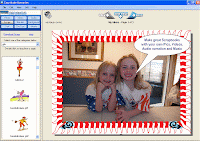
With Easy Made Memories 2.1 you can turn your photos, videos, and audio clips into professional quality DVDs, complete with your own DVD disk and cover graphics. This free digital scrapbooking software includes over 2000 scraps, die cuts, backgrounds, borders, and audio clips. It is easy to import the movies from your digital camera, or narrate your scrapbook with your own voice and music.
This program seemed pretty good until I discovered that there was no way to burn to DVD and that the online ordering service didn't seem to work. My verdict is don't bother unless a new version of this program is released that allows you to burn to DVD from your computer.
DIGITAL SCRAPBOOKING SOFTWARE - SHAREWARE
Photo Collage Maker
Price: $24.00 Shareware
Downloadable Free Trial Version available (30 runs)
System requirements: Windows
 |
| Photo Collage Maker |
Photo Collage Maker is digital scrapbooking and photo collage software that you can use to create and print scrapbook layouts. With Photo Collage Maker you can enhance your photos with effects and spice up your creations with borders, frames, backgrounds, and clipart. The software supports most popular digital file formats including jpg, gif, tiff, etc. Both photos and clip art can be rotated, resized. The program offers the option of a variety of artistic photo effects and the facility to manipulate your photos using layers.
PhotoMix
Price: $29.00 Shareware
Downloadable Free Trial Version available
System requirements: Windows 98, 2000, ME, XP, Vista, 10MB free disk space, 128 RAM
PhotoMix is a digital scrapbooking and photo collage creation software which allows you to create scrapbooking layouts, digital collages, or calendars quickly and easily. PhotoMix comes with a huge range of templates to get you started. The scrapbooking software is easy to use and comes with comprehensive tutorials. In addition there are also graphics kits available for download that will help you create pages in minutes on themes like Thanksgiving, Halloween or Fall. Bear in mind though that most of the graphics kits aren't free and cost around $5.00 to download. In the trial version there is a limitation on the file formats that output can be saved to. For instance .jpg is only available in the full version.
Wondershare Scrapbook Studio 1.2.0
Price: $39.95 Shareware
Downloadable Free Trial Version available (30 days)
System requirements: Windows XP, Vista, 500MB free disk space, 256MB RAM
Wondershare Scrapbook Studio helps you to create a professional looking scrapbook. Wondershare Scrapbook Studio creations can be printed or shared with family and friends directly via E-mail or slideshow. The program includes backgrounds, embellishments, and ready-to-use scrapbook templates to help you create memories in minutes. The robust photo editing tool helps you crop, rotate and flip photos, add a frame, shadow, mask, text as well as special filter effects to photos. With this program you can create customized flash slideshows with soundtracks and eye-catching transitions. Please note that the trial version places an "Evaluation Copy" Watermark on the created collages.
Scrapbook Max 2.0
Price: $47.96 Shareware
Downloadable Free Trial Version available (30 days)
System requirements: Windows 7, Vista or XP, 5GB free disk space, 512 RAM

Scrapbook MAX is a digital scrapbook software program that can be downloaded from the internet for a free 30 day trial. Be aware though that the trial version contains only a fraction of the templates of the full program and also watermarks any pages output. Only when you buy the software will you be able to remove these watermarks.
With Scrapbook MAX you can turn your digital scrapbooking pages into photobooks and albums and make slideshows and movies. It is easy to share your online digital scrapbooking gallery on your blog, and your Facebook or MySpace pages. Scrapbook MAX allows you to edit your photos and add artistic effects to make individual scrapbooking pages. Also available for this program scrapbooking shapes, embellishments and expansion packs.
In this article I have discussed freeware and shareware options for free digital scrapbooking software. There are of course other programs on the market and I will be covering some of these in future articles.
Related Links
Top Digital Scrapbooking Software Review Comparisons